‏إظهار الرسائل ذات التسميات Windows Phone. إظهار كافة الرسائل

السبت، 16 أبريل 2016

Microsoft Lumia 640 XL At ₹ 10,999.00


Specifications:-


  • 13MP primary camera with LED flash and 5MP front facing camera
  • 5.7-inch (14.47 centimeters) IPS LCD multi-touch capacitive touchscreen with 1280 x 720 pixels resolution, 259 ppi pixel density and 16M color support
  • Windows Phone v8.1[Update Availabe For Windows 10] operating system with 1.2GHz Qualcomm Snapdragon 400 quad core processor, 1GB RAM, 8GB internal memory expandable up to 128GB and dual SIM (GSM+WCDMA)
  • 3000mAH lithium-ion battery providing talk-time of 31 hours 13 minutes on 2G, 23 hours 42 minutes on 3G networks and standby time of 936 hours.

 Buy Now At Amazon


الجمعة، 8 أبريل 2016

How To Add India Premiere League (IPL) 2016 Schedule To Your Smart Phone?


For Outlook Calendar:-

1. Download the IPL 2016 Schedule From Below Link.
2. Open Outlook & Login With Your Account.
3. Now Open Calendar.
4. Now, Click On Import Button & Open The IPL 2016_Matches.ics File.
5. Click Ok!
6. Done! Enjoy!

For Gmail Calendar:-

1. Download the IPL 2016 Schedule From Below Link.
2. Open Google Calendar Then Click On Settings Icon [Right Corner] Again Click On Settings.
3. Go To 
        Calendars-->Import Calendar-->Choose File-->Import.
4. Done! Enjoy!


Now,Sync Your Smart Phone To View  IPL 2016 Schedule On Your Smart Phone.


 IPL 2016 CALENDER

الأربعاء، 30 مارس 2016

Watch Microsoft's Build 2016 Event Live Streaming Here!


السبت، 26 مارس 2016

Reliance Free 500 MB 3G Internet

\

Get 500MB FREE On Reliance Instacare App

Steps:-
  1. Download & Install Reliance Instacare App.[Android||Windows||iOS]
  2. Register An Account.
  3. Verify Your Reliance Mobile Number.
  4. Wait For Complete The Process.
  5. After This You Will Get 500MB 3G/2G Data In Your Register Mobile Number.
  6. Done!Enjoy!!!


Features:-
1. Recharge & pay bills for any Reliance number (both pre & post login).
2. Add multiple members (postpaid and/or prepaid).
3. Activate/Deactivate VAS packs.
4. Track your data usage.
5. Create service requests.
6. Check balance & outstanding.
7. Buy packs.
8. Get bill due date / balance details.
9. Download bills.

10. Subscribe to latest caller tunes.

الخميس، 17 مارس 2016

Finally!Windows 10 Mobile Upgrades For Windows Phone 8.1.

Today, Microsoft roll-out  Windows 10 Mobile to select Windows Phone 8.1 devices. There are a lot of great new features in Windows 10 Mobile, like Continuum, Windows Hello and Cortana.


You can see the current list of Windows Phone 8.1 devices that are supported for the upgrade to Windows 10 here.


Lumia 950

This list includes a limited set of Windows Phone 8.1 devices and does not include some devices that are currently running Windows 10 Mobile in the Windows 10 Mobile Insider program. As Windows 10 delivers significant new innovations, many older devices are not able to successfully upgrade without an impact on the customer experience. Our goal is to only offer the Windows 10 upgrade to devices that we are confident can continue to deliver a good customer experience.
Lumia 550


For more information on Windows 10 for phones, go here.
To download the Windows 10 Upgrade Advisor app, go here.

Source:MICROSOFT

السبت، 7 نوفمبر 2015

Windows Phone Most Secure Smartphone OS


According to hacker and security expert of 15 years, Steve Lord. When asked to rate the three most popular OSes in the market by security, he called Windows Phone the 'toughest nut to crack':
All have benefits and drawbacks. Currently Windows Phone seems to be the hardest nut to crack. Blackberry has a long history of being very security-focused. If I have physical access to the device, I find Android’s usually the easiest target. Then comes iPhone, then older versions of BlackBerry. If it’s over a network or I have to attack via email or message, Android’s usually the softest target.
While Windows 10 Mobile is, of course, considered by Microsoft to be its safest product yet, Lord also had nothing but praise for older versions of Microsoft's mobile OS:
Older smartphones tend be considered less secure as they’re usually affected by known weaknesses. If you’re using an older phone you’re better off with a classic dumb phone. If you have to have an older smartphone, use an older BB10-based Blackberry, or a Windows Phone running Windows Phone 8 or newer.


This must all be considered in the context of Windows Phone's meager marketshare, of course. Windows users have often made the argument that Apple's wares are more secure due to their limited financial appeal to hackers: why try to exploit OS X when you can spend the same amount of time on Windows and have 7-8 times larger an audience for your exploit?
Similarly, given Windows Phone's scanty marketshare of just 3%, it is also quite likely that Microsoft enjoys added security due to the lack of known exploits - and hackers' lack of enthusiasm in finding more.
When all is said and done, though, Windows Phone does seem to prove a formidable challenge for anyone wishing to tamper with your device and, given Microsoft's current misfortune in the mobile play, it certainly needs all the good news it can get.
Source: WhatMobile.net via WMPoweruser | Digital lock image via Shutterstock
               Neowin

الاثنين، 1 يوليو 2013

FREE cross platform messenger with voice calls comes to India, 'Line' comes with stickers like like Disney, Hello Kitty and Iron Man

FREE cross platform  messenger with voice calls comes to India, 'Line'  comes with stickers like like Disney, Hello Kitty and Iron Man

Fresh on the heels of the successful launch of Tencent's WeChat, Japan's Line Corporation has entered India with its cross platform messaging App called Line.   What is more important is that it supports PC and Mac in addition to Android, iOS, BlackBerry, Windows Phone and Nokia Asha and the dream of us all, it is free.

The instant messaging App also has features like free calls, voice chat and stickers.  
FREE cross platform  messenger with voice calls comes to India, 'Line'  comes with stickers like like Disney, Hello Kitty and Iron Man

To make it more appealing to Indians, the company has launched a Hindi website in addition to the English one.  The App is similar to  WeChat because Line also has the features features like voice messaging and stickers Indians which we got to know from WeChat.  However Line has a nice range of its own stickers like Disney, Hello Kitty  Iron Man. 

The features of Line .
 More about LINE’s Features:
★Free Voice Calls!
All LINE smartphone users can enjoy free high quality voice calls, whenever and wherever you are.
Talk for as much as you want and best of all, it’s free!
★Messages Delivered to you Quick!
Instead of taking time to email/sms your friends, use LINE’s message function to send messages easily with colorful icons, photos and even location information.
・Express yourself using stickers and emoji.
・Send photos and voice messages with ease
・Available for PCs and smart-tablets
★Make it YOUR Social Network
・Have fun with LINE’s ‘Home’ feature: Share your moments with all your friends using photos, videos, and location info.
・Use ‘Timeline’ to see what your friends have been up to and what they have posted! Leave comments, messages and enjoy your communication.
Other LINE Features:
★New Sticker Shop! Find all your favorite characters here!
Hilarious and fun stickers featuring famous characters from all over the world can be found here!
★Get the latest info with LINE Official Accounts
Add these accounts as friends and receive messages from popular celebs and singers, as well as money saving coupons from various businesses.   

Do remember this App uses internet to communicate, hence be sure to have a unlimited data plan while using it.

Visitors who want to read about it and download it in Hindi please head over here.  

Android users can download the App from Google Play here.

iOS users can download the App from Apple Store here.

Windows Phone users can download the App from Windows Store here.  Supports Windows Phone 7.5 and 8.

BlackBerry users can download the App from appworld here.

Nokia Asha users can download the App from OVI store here.

Windows users can download the App for their PC here.

Mac OS X users can download the App for their Macs here. 

Windows 8 users can download the App for Windows 8 here.

الخميس، 27 يونيو 2013

Twitter App update for Windows Phone allows you to view translated foreign languages; BlackBerry App too updated

Twitter has updated its Windows Phone App and now brings a interesting feature to users.  Users can now view the foreign languages translated into their native one on your timeline.  The built-in translation feature will be powered by the Microsoft Translator API. 
Twitter App update for Windows Phone allows you to view translated foreign languages; BlackBerry App too updated

The latest update is  available for Windows Phone 7.5 and 8.  If users will remember, Twitter had updated the Windows Phone App in May 2013 to give you a nice UI experience in addition to support for Vine and 8 photo filters for images.  The update now jacks up the version number 2.2.0.0, is available for Windows Phone 7.5 and Windows Phone 8 from the Windows Phone Store here.

BlackBerry users have also been given a update for their Twitter App.  This update primarily is for image enhancement.  Still there is no sign of any filters for BlackBerry App but it bring features like photo card support, indicators for 'Retweets' and 'Favourites' also when you now expand a tweet on your BlackBerry devices, you will be able to view images in-line.

The app update pushes it to version 4.2 and is available for almost all BlackBerry phones, you can download the updated App from BlackBerry World.

الأربعاء، 26 يونيو 2013

Windows Phone HTC 8XT and Samsung Ativ S Neo coming to Sprint this summer with unlimited LTE access

Windows Phone HTC 8XT and Samsung Ativ S Neo coming to Sprint this summer with unlimited LTE access

Good news for US citizens, get a new phone and unlimited LTE access as a added bonus.  Sprint has come out with a truly superb plan aptly called the Truly Unlimited Plan.    Here is a image as to how it works out :
Windows Phone HTC 8XT and Samsung Ativ S Neo coming to Sprint this summer with unlimited LTE access

Add to that the latest Samsung Ativ S Neo and HTC 8XT will be available under this plan.  The plan will be offered in select US regions and promises unlimited 4G LTE data use with no overage charges.  

About the phones :
HTC 8XT :  
Windows Phone HTC 8XT and Samsung Ativ S Neo coming to Sprint this summer with unlimited LTE access
HTC 8XT is the latest Windows Phone 8 offering from HTC.  It will have a 4.3 inch 720p (not confirmed yet by HTC) 800 x 480 pixel display.  It will be powered by 1.4 GHz dual-core Snapdragon 400 processor with 1GB of RAM, 8GB of internal memory and a microSD expansion slot.  The rear shooter will be 8MP one and the front one will be a 1.6MP affair.  

The 8XT will have all the necessary connectivity options like Wifi, LTE, bluetooth etc.   The HTC 8XT will be powered by  1800 mAh battery which seems to be on a lower side considering this medium specced phone.  The best part of HTC is its front speakers boom sound.

2. Samsung Ativ S Neo 
Windows Phone HTC 8XT and Samsung Ativ S Neo coming to Sprint this summer with unlimited LTE access
Nothing is known about the specs of Ativ S Neo other than it is will upgrade of  the earlier ATIV S.  It will  have a larger 4.8-inch display of 720p resolution (not confirmed), a dual-core 1.4 GHz processor, 1 GB of RAM and a 2000 mAh battery. It will have a 1.9MP front camera with something called "Manga Camera" and "Beauty Shot"  The rear camera will be 8MP one with LED flash.

As the HTC 8XT the Ativ S Neo will also have the usual connectivity solutions.  

Sprint has said that the phones will be available in "Summer" by which I can safely assume it will be available by July.  You can sign up for the alert message from Sprint here so that Sprint informs you about the availability of the phone.  

This is good news for both users and Microsoft because Microsoft has just crossed 100000 Apps on Windows Phone store as well as launched a preview of Windows 8.1.

Do watch out for the very very small terms and conditions on the Sprint page for any hidden charges.

الخميس، 20 يونيو 2013

Play Temple Run on your Nokia Lumia 520, Lumia 620 and Lumia 720 for free

Play Temple Run 2 on your Nokia Lumia 520, Lumia 620 and Lumia 720

Users having Lumia phones with less then 1GB of RAM have been complaining about not being able to play the popular running game Temple Run.  Well, Nokia has paid heed to their demands and with Micorsoft has updated the game sot that it can now be played with devices running on Window Phone 8 even with 512MB of RAM.

The announcement was made over Twitter by Joe Belfiore, head of Product Definition and Design, Windows Phone 8. Belfiore tweeted, “A bunch of you tweeted me asking for Temple Run for your 512MB WP8 phones. Grab it now”.

To play Temple Run on a Windows Phone 8 device, you need certain permissions, including phone identity, media playback, data services, movement and directional sensor and either an HD, WVGA or WXGA resolution display.   You can read about this fascinating game here.

Meanwhile if you have a Lumia 520, 620 or 720 visit the Windows Phone Store and download the Game right now.

The game is actually Temple Run not Temple Run 2, which a reader brought to my notice.  I am extremely sorry for the error.

الثلاثاء، 18 يونيو 2013

Gaana upgraded to version 2.0 for Android and iOS; launches Singalong App for Karoake style singing for PC

Gaana, the Indias premier music streaming and downloading site from Times Internet has updated its Android and iOS version to 2.0 and launched a  premium version called Gaana+.  The only difference is that Gaana comes with ads and Gaana+ comes ads free.  The Gaana+ will leave your pockets empty by $2.99(Rs.165.00) for Indians and $3.99(Rs.220.00) for rest of the world.  The other benefit of having Gaana+ will be that you can play music offline and the quality of streaming is much higher.
Gaana upgraded to version 2.0 for Android and iOS; launches Singalong App for Karoake style singing for PC

Simultaneously Times Internet has also  launched a karaoke-style for Gaana, which rates the quality of your singing and allows you to challenge your Facebook friends.  This App called called SingAlong let users notch points for singing against their friends and it has a leaderboard of best singer.   You get to choose from more than 300 songs across 5 different languages and multiple genres, including jazz, ballad, R&B and pop.  SingAlong doesn’t require any songs to be downloaded, they are instead played back via streaming. You can browse or search the available songs, queue multiple songs and favourite the ones that you like. Times has promised that Singalong will also be available across mobile platforms soon.

To download Gaana for your Android visit Google Play here.

To download Gaana for your iOS visit Apple Store here.

To download Gaana for your BlackBerry visit here.

To downlaod Gaana for your Windows Phone visit here.

To download the Java version of Gaana for older Java supported phones visit here.


Skype Video Messaging now available for PC, Mac, Windows 8, Windows Phone, iOS, Android and BlackBerry

You must have previewed this one or at least heard of the Skype video messaging App.  Now Microsoft, owner of the Skype has announced a full fledged release of 'Skype Video Messaging' as follows :
Skype for Windows desktop, Skype for Windows 8, Skype for Mac, Skype for iPhone, Skype for iPad, Skype for Android and Skype for BlackBerry. 

Skype video messaging lets you  record and share a personal video message with your friends, colleagues and near and dear ones, even when your friends and loved ones are offline and then send it to them.  They will be able to view your message as soon as they log on to Skype.  Skype is good because your video message will reach only the intended contact and nobody else can view it.  

To send a video message on Skype, tap the "video message" button. Then tap the record button to capture your video message. Your video message can be three minutes long maximum and you can preview it before sending. You can delete and re-record your video message, until you have achieved the desired result. Once you're ready to send your video message, click on the envelope icon. Skype users can now send as many video messages as they want, at no cost except for the data charges. Check out the demo video below to understand it.


To download Skype for click below


الاثنين، 17 يونيو 2013

6Sec a 'Vine' like App for Windows Phone 8 that lets you share 6 seconds loopy videos just like Vine

Windows Phone always trails behind iOS and Android devices when it comes to Apps and Games.  Vine was released and is being by both Android and iOS users.  Twitter as of yet hasn't launched 'Vine' been launched for Windows Phone 8 but there are die hard developers who come with their own versions to suit the users needs.  One such developer, Rudy Huyn has come out with a nifty little App aptly called 6Sec for Windows Phone 8 and it is free too.
6Sec and 'Vine' an App for Windows Phone 8 that lets you share 6 seconds loopy videos just like Vine

6sec is still in beta stage and is currently receiving daily doses of updates based on the feedback from Windows Phone users.  And with the latest updates it seems more and more like 'Vine.'  The app lets you create and upload Vines, share them on your Twitter timeline and gives you live tiles of the app on your phone. 

The system, says WPCentral, does not involve any “hacked” APIs. Instead, 6sec, quite like Instagraph, involves using a relay server to push videos to Vine’s servers. 

Though the App is not quite 'Vine' but till 'Vine' is officially launched 6Sec can have its days of glory.  6sec looks quite like how the video looping app should look like on the platform and beggars can't be choosers so if you have a Windows Phone 8 you can download it right here.

الجمعة، 7 يونيو 2013

'Nokia Conference' a new conference calling available for Windows Phone 8 (Lumia) from Nokia Beta Labs

'Nokia Conference' a new conference calling available for Windows Phone 8 (Lumia) from Nokia Beta Labs

Nokia Beta Labs, the Nokia's R & D site has announced the update of 'Nokia Conference'.   The updated App will remove all the problems like attempting to join a conference call, faced by Lumia users running on Windows Phone 8.  

The Nokia beta Labs reports that once the App is downloaded and installed, the Lumia will figure out what call it needs to join based on the schedule set on your calendar. The beta version App can also handle recurring calls in addition to the facility of voice recognition.  This should be a good move for Lumia users as this means that you can join a conference just by saying the words “conference join".

The latest move is a concentrated effort by Nokia and Microsoft to make Windows Phone more business friendly and the Nokia Conference is one of the moves to attract businessmen to Lumia range of Phones.  The App also provides with an option to integrate it with Microsoft Lync and would help in automatically launching the app if your company uses it.

In addition to the above, Nokia Conference also automatically detects the settings for the conference call systems of many companies with manual addition facility for a odd unknown system.
Though this is a beta version, it gives you full use of the features and perhaps you can tell the Nokia Labs engineers what more you need from the App by testing the Beta version.  To download the beta version visit the Nokia Beta Labs website.   You can sign in with your Nokia id.   Do remember this App works only on Lumia running on Windows Phone 8.

الاثنين، 3 يونيو 2013

Adobe Reader available for Windows Phone 8, download it now!!

The PDF Reader was officially released today for Windows Phone 8 by Adobe Inc.  Microsoft, via its blog, informed that the App will include cut, paste and copy abilities.  
Adobe Reader available for Windows Phone 8, download it now!!

You can also zoom in on the PDF files to the exact para and open password protected files from this App.  Bookmarking is also supported so you can scroll large tomes of PDF documents with ease.  The in-PDF links can be opened within the App with a long press on the link.  The only disadvantage is that as of now the App is only available in English.

The salient features of the Adobe Reader for Windows Phone are 
• Quickly open PDF documents 
• View password-protected PDFs and sticky notes
• Search text to find specific information 
• Select single page or continuous scroll modes 
• Easily zoom in on text or images for a closer view
• Use bookmarks to jump directly to a section in your PDF document
• Tap on links in a PDF to open linked web pages
• Quickly navigate through large documents using thumbnails
• Select and copy text from a PDF file to the clipboard

The Adobe  Reader for Windows Phone 8 version can be downloaded free of cost here.  

Vijay Prabhu

Windows Phone Challenge from Microsoft, dare you phone against Windows Phone and win Rs.1000.00

Microsoft it so sure that its Windows Phone can beat your current smart phone pants down, it has started a challenge in India to endorse the fact.
Windows Phone Challenge from Microsoft, dare you phone against Windows Phone and win Rs.1000.00
Microsoft challenges you to see for your self whether your smart phone has what it takes to beat Windows Phone.  You will have to perform simple tasks with your phone and Window Phone and if your smart phone wins, Microsoft will hand over Rs.1000.00 to you.  Sweet! Like the Samsung did with stare for 60 minutes campaign in Europe for Samsung Galaxy SIV, Microsoft has invited you to for the challenge here in India.  The challenge kicked off  yesterday from the silicon city, Bangalore, Hyderabad and Chennai.  

Don't fret if you have missed the June 1 appointment, the challenge will continue till 30th of June 2013.  It will be held in six cities of India viz. Bangalore, Chennai, Coimbatore, Delhi, Hyderabad and Mumbai. 

All you have to do is visit the Microsoft's Windows Phone Challenge website, check out for the dates available for your city and visit the Mall listed there in.  If you are not winning the 1K with your smart phone, don't be dismayed, Microsoft is offering goodie bags for all those participate in the challenge.  

It is offering other gifts as well with the purchase of Windows Phone at the places listed in the website.  Windows is also promoting the challenge on Twitter using the hashtag #MyNextPhone. 

You can also follow the challenge on the respective Facebook page for the city you live in.  Visit the challenge website here and my  wishes to you.   Happy hunting and best of luck.

Vijay Prabhu

الجمعة، 31 مايو 2013

Shazam now available for Windows Phone 7.5/8, explore Music, download now!

Shazam now available for Windows Phone 7.5/8, explore Music download now!

Sure and steadily Microsoft is getting the biggies from Apple and Android to make a launch for Windows Phone and the latest entrant is Shazam.  Music discovery App Shazam has finally made its way to Windows Phone devices, just a week after the launch of an iPad app. 

This Windows Phone optimised version will bring its signature tagging from home screen as well integration with Xbox Music and Nokia Music.  Windows Phone 8 users will be able to identify songs that are currently being played, as well as tag artists, track song names and albums.  But unlike the iOS or Android app that links users to iTunes, Spotify or Rdio, the Windows Phone Shazam App will guide you to Xbox Music and Nokia Music.  Though you can watch YouTube on Shazam.

As in Android and iOS, Shazam also has local tag features and will flag up what you have tagged and listened to every 30 minutes.  Shazam will give you the option of showing these tags as a tile on the home screen. You will also be able to set your favourite cover art or tag charts as your phone’s wallpaper using this app too. The additional advantage with Windows Phone 8 App is that you can pin the tagging button to your homescreen for a quick access faster.

So, if you are a music afficionado, you can head over to Windows store to download Shazam.  A Pro verison  called Encore available for Rs.310.00 for hard core music fans here.

Vijay Prabhu

الخميس، 30 مايو 2013

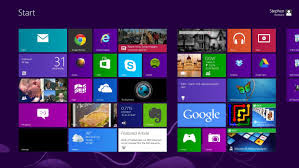
Microsoft to change from Tile Menu to Start Menu in Windows 8.1, only just

Microsoft to change from Tile Menu to Start Menu in Windows 8.1, only just
Image courtesy engadget.com

Never liked the Windows 8 tiled menu? You are not the only one, I myself had upgraded to Win 8 from 7, but after a while got tired of looking at the tiles, searching for my Apps and then reverted back to Win 7.  Having a smart phone like interface for Windows 8 may have its admirers, but it did not have the numbers Microsoft would have liked.  So what does Microsoft do? 

The answer is simple, go for the middle path.  And that is what Microsoft has done with Windows 8.1. Microsoft will publicly show off the improvements it has made to Windows 8.1’s Modern UI sometime tomorrow.  

Its been 7 months since the launch of Windows 8 and bowing to the popular opinion Microsoft has made many changes in the Windows 8.1.  It will be available free to the Windows 8 users through the Windows Store.  Touch was the essence on which Windows 8 was built and 8.1 will continue the legacy.   Some of the changes that have been incorporated in Windows 8.1 are given below.

The Start menu
This is one issue which formed the crux of many threads in various fora.  It has had its critics and likes but not having the control panel easily accessible is the biggest drawback of Windows 8.  Microsoft  seemed to have realised that!  But it is only visible in a tiny line buried at the end of the Microsoft blog.  In Win 8.1, you’ll now be able to choose from different views to boot into and select your own options.  Its a change but only just.  

Microsoft also says the “hint” icon displayed when hitting the lower-left corner of the screen has now been changed so that a Windows logo appears, and it will always be visible in the Desktop mode. So this somewhat evokes the old Start button, but doesn’t quite reinstate it.

The Start screen
The Start screen will now consist only of tiles that you want to pin there. The earlier "All apps" view was much better organised but also difficult to find. This view now pops up with a swipe upwards from the bottom of the screen that is if you aren't using it by default from boot menu.  Another thing Microsoft has done is that the newly installed Apps tiles will be highlighted similar to what we have in Windows 7.  So ultimately the start screen will show only the tiles you want to see.

With the tiling system, the tiles in Windows 8 were prone to be accidentally moved or displaced.  With Win 8.1, that has been solved to a extent because in Win 8.1 you will need to tap the tile and hold or right-click to move them around.  Win 8 also offers a wider range of tile sizes to choose from. The new small and large squares make the Start screen look very similar to Windows Phone 8’s main menu. Multiple selection of tiles was a much needed relief, for you can now resize, move and even get rid of several tiles in one go.   However there is no information in the blog whether  all tile animations can be turned off in one shot.

There are also more choices for the Start screen’s background. There are more colours and new “tattoo” patterns (including animated ones), but users will most likely appreciate the ability to use any customised image as the background and also have a single  image as desktop wallpaper and Start screen background. 

PC settings
As I had noted above Windows 8 made a simple task of getting into the system a presumably difficult one for users because Control Panel was not easily accessible to users.  With Windows 8.1, Microsoft says that would not be much of a problem right now.  Though explicit shortcut to Control Panel has not been provided, but Microsoft indicates that there should be nothing in the Control Panel that cannot also be found outside the desktop, including hardware setup, power management and domain management.

The lock screen
You can now run a Slideshow as a screensaver when your device is lock.  The slides can contain anything you have stored on the hard disk or in you cloud accounts.  Windows 8.1 also gives you ability to take photos from the webcam even when the device is locked.

Multitasking
The Snap feature in Win 8.1, is now not limited to specific screen sizes. You can snap two apps next to each other and drag the bar between them arbitrarily. You can also have two instances of the same app snapped next to each other on screen, such as two document windows. PC users with more than one monitor will be able to snap even more apps together on screen, run different full-screen apps on different monitors and even leave the Start screen permanently visible on any one monitor. 

Windows Store
Free apps will be easier to find and the homepage will have pinned lists of top picks and new entries. Related apps are now listed in an app’s detailed view, along with more descriptive information about it. Apps can update themselves in the background instead of requiring a user to check for updates. 

Others
Internet Explorer has been further updated to version 11. Microsoft assures that touch response is improved, pages will load faster, there’s no limit on open tabs and you can choose to have the address bar visible at all times.  

Search and cloud integration
Searching for anything from the Start screen or within the Modern UI will now bring up a Bing results page with results from the Web, your synced SkyDrive and social accounts, and apps. Results will come with “Quick Actions” shortcuts for doing things such as playing media files. The new search experience is described as “the modern version of the command line!” by Microsoft.

Microsoft has said that the preview will be launched on June 26, coinciding with the Microsoft DEVCON and you may get your hands on the new build soon after that.

Vijay Prabhu