‏إظهار الرسائل ذات التسميات tweak. إظهار كافة الرسائل

السبت، 5 مارس 2016

How to Change IMEI of Any Android MTK Devices


IMEI Tweaking is one of the methods which some folks used to change the imei of MTK phones to that of other phones with the intension of commiting a crime or free data on the internet. Some telecoms provides promotions with some device by replicating those promotional devices IMEI to your phone you are same time qualified for such promotion without actually buying the said device.


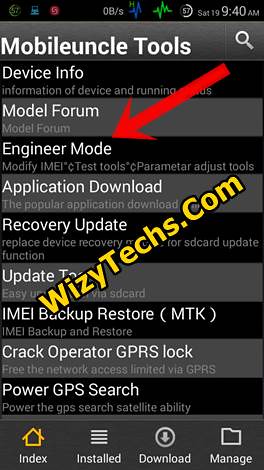
In this tutorial, we will use mobile uncle tool and MTK engineering mode tool. These two IMEI Tweaking apps works relatively. They work alike with the same user interface. However, I included the mtk engineering mode app because some MTK Android phones doesn't work well with mobile uncle tool so I decided to add the two  in case one didn't work f, you can use the other.

What Do You Stand To Gain If You Tweak IMEI?
* You Will enjoy  Glo BIS and Airtel BB 10 Using IMEI of Q10 on your Android MTK
* You now tweak any available free data on new phones into your own phone. For instance, getting free 325mb, 3gb, 100mb, 2015gb, 1gb from mtn and 500mb, 150mb from Etisalat. Also 2gb from Airtel and many more free data

Is There Any  Disadvantages Of Tweaking Phone IMEI?
Everything that have Merit will one way or the other has Demerit and IMEI tweaking followed suit.
* IMEI tweaking is unlawful in many countries so tweak at your own peril
* IMEI tweaking automatically voids your phone warranty
* You can brick your phone if you don't follow the right steps while tweaking IMEI

How Can I Tweak IMEI?

IMEI tweaking is not a tedious task is as simple as any thing ranging from swiping right and left, as simple as that.
Materials Needed
* Your MTK Android
*  Mobile uncle tool App. Download it here
*  MTK engineering mode. Download it here
*  Final Focus

Procedures:
Follow the below steps which is very simple to follow;

1. Open and run the mobile uncle tool or the mtk engineering mode app you installed
2. On the app menu, tap on "engineering mode"
3. A new page will open, select engineering mode (MTK)


4. Another page will open, now swipe right to connectivity page in the mobile uncle or mtk engineering mode app

5. Now select "CDS information"

6. On the new page that opens, tap on "radio information"

7. Another page will open containing two options. This two options appears in phones with dual SIM but if yours is only one SIM, you will see only one option. Now select the preferred SIM you want to do it.
Phone 1 is for SIM one

Phone 2 is for SIM two.
In this tutorial, we are making use of SIM one. So tap on phone one


8. Place your cursor just after the AT+ and type this EGMR=1,7,""
 

9. Now enter the IMEI number you want to tweak just between the two quotation marks " "
10. After typing the IMEI, recheck and see if it is 15 digits and tap on "Send at command"


11. You will see a small pop up message saying that your command has been msent
That's all. Now to check the IMEI you just tweaked, dial *#06#

Feel free to share this with your friends and remember to ask us anything if you need a more guideline.

Happy Tweaking!
Disclaimer: Changing of IMEI is illegal in some countries, and I will not be held responsible for any consequences that befall the changer.
Remember to write down your original IMEI number and keep it safe. Also, backup your original IMEI incase anything goes wrong, then revert using the above procedures for changing.

Once you Chang your IMEI of android MTK device, your phone assumed the identity of another device but still function normal.


السبت، 7 نوفمبر 2015

How to Disable Background Apps/Services in Android Phones


How to Disable Background Apps/Services in Android Phones


Are you getting worried by applications and services that automatically runs in background even you don't want to and these apps consumed a lot of RAM. This can cause your phone to lag and run slowly in this write up, I am going to show you how to solve your android headache.

There is an application which is "Disabled Service" which can disables your applications and system services from running in background. Useful when your ram is a little bit low.
To start this process your phone must be rooted and Disable Service app installed on it.

Download first Disable Service app from Google Playstore.

Secondly, you have to look for the services that you want to disable.  NOTE you must understand and you must know what you are trying to disable.

The next option is to open Disable Service and look for the blue font-colored number count from the system name, it indicates the number of running services. The blue font-colored services are the current running services. Uncheck it to disable. The red font-colored number indicates the number of disabled system process.

Done.
ENJOY

الاثنين، 2 نوفمبر 2015

How to Fix Invalid IMEI - Unknown Baseband

How to Fix Invalid IMEI - Unknown Baseband

I got this problem with my phone's IMEI, what is responsible for this?

One must know the exact reason why you are stuck with the stated question. That kind of things occurs once you lack the so called "carefulness". You must practice yourself to back-read the comments of other users for a specific tweak/application you are trying to run as what you are doing is a kind of suicide for your phone.

To this IMEI problem, it's a bit impossible for it to exist on an untouched Stock ROM version. This case is one of the troubles you can possibly encounter once you have root-tasks performed such as trying out tweaks or installing custom ROMs. These tasks could mess some part of your phone's system that eventually leads to corrupted OS.

Also Read: How to make android scatter file

Unknown IMEI and Invalid IMEI

It may look identical but somehow it gives us a clue on what could be the source of the problem. If your phone is showing Invalid IMEI, it is more likely you just have to replace a working IMEI for your device. While on the other hand, Unknown IMEI seems to be a bigger problem, usually the Baseband as well is read Unknown. The corrupted baseband leads to the lack of communication feature of the phone.

How do I solve it?

By following the methods below, hopefully we could end up fixing your phone's IMEI and Baseband and for you to continue doing calls and sending SMS.

How to Fix Invalid IMEI

Caution: Always remember that root-related actions are your sole responsibility.

Requirements:
  • MTK-based android phone in hand
  • Root access
  • IMEI number
*  You can find it by removing the back cover of your phone and look for IMEI 1 for SIM 1 and IMEI 2 for SIM 2.
*  it is also written on the box
*  No luck? use the IMEI from the same phone
Step 1:
1.    Head to Engineering Mode
o    Dial *#*#3646633#*#*
o    If the above dial doesn't work, download and install MTK Droid Tools. Open it, select Engineer Mode -- Engineer MTK.
2.    Go to Connection tab
3.    Select CDS Information
4.    Now, select Radio
5.    Select the SIM which you want IMEI to be fixed.
6.    Input the following:

For SIM 1, at the AT+ line, make it look like this (replace the red text with your phone's SIM 1 IMEI number):
AT+EGMR=1,7,"SIM1_IMEI_NUMBER"
For SIM 2:
AT+EGMR=1,10,"SIM2_IMEI_NUMBER"
   
  7.  Press SEND AT COMMAND to send and save the IMEI.
     8.  The panel will close automatically. If you are done, reboot your phone.

Step 2:
==  Download and Install Terminal Emulator on your device
==  Open Terminal Emulator 
==  Type SU then press Enter
==  If asked for Superuser permission, grant it.
== Then, type the following command then press Enter.
echo 'AT+EGMR=1,7,"IMEI_NUMBER"' >/dev/pttycmd1
echo 'AT+EGMR=1,10,"IMEI_NUMBER"' >/dev/pttycmd1
==  Restart your phone.

How to Fix Unknown Baseband and IMEI

If you have done replacing your phone's IMEI using the given method above but still it won't work and also the Baseband was still unknown, follow the steps below...

N/B: if you are carrying out these procedures you are doing it on your own risk.

Requirements:
  • MTK phone
  • Root access
  • Windows computer
  • MTK Droid Tools
  • IMEI Number - written at the back of your phone (remove the back cover)
  • Android USB ADB drivers
  • NVRAM backup from other device with the same model
    • Sorry but this is the only safest way. You can comment your phone model so I can help you look for it. Once you had the NVRAM backup, copy it in your computer
Procedures:


a)   Download MTK Droid Tools and extract it on your computer running Windows OS
b)   Download and install USB ADB drivers
c)   Enable USB debugging on your phone (go to Settings -- Developer options) and connect to your computer using USB cable.
d)   From your computer, open MTK Droid Tools application.
e)   The tool should detect and display your phone information.
f)     Click the ROOT button for temporary Root shell access on your phone.
g)    
h)   Click on IMEI/NVRAM
i)     Click Restore button, and then select/open the NVRAM backup that you got.
j)     Change IMEI, input the ones you have.
k)   Then click Replace IMEI
l)     Restart your phone.
m)  finished
Source: XDA and to the developers of the apps we used.

الجمعة، 30 أكتوبر 2015

How to get MTN 1GB Data with Just N500


With  infinix hot 2 you can get MTN 1 gig for #500, it is very straight forward, below are the processes:
Just tweak your MTK android  IMEI with the Infinix Hot2 IMEI .

 
a Tweak your Android MTK IMEI with: 359869060006361
b just  change the last 2 or 5 digits to your choice.
c After  tweaking IMEI, recharge your MTN SIM with N500, then text A1 to 131 
d MTN 1GB will be given to you instantly.

ENJOY!