‏إظهار الرسائل ذات التسميات browsing. إظهار كافة الرسائل

الثلاثاء، 7 يونيو 2016

How to get MTN Free 150MB On MTN game

At last we can smile now not minding the fact that is just 150mb,  but that is not withstanding.

Note that this is not the regular music plus MB which is also 150mb in bits but this one is  is called game data. Though you can also use it to power all apps including using it on PC with the aid of VPN apps andPdaNet.

I will be showing you how to get your own free 150mb and enjoy it with the settings on psiphon that I will show you here.

If you are using  Psiphon to surf before, it won't be difficult for you.

Again if you have used MTN MusicPlus or BBLITED before on psiphon, all you need to change on your psiphon settings is the proxy server and you are good to go.

Leave other settings as it is.
We are currently working hard  to see how to auto renew it or make it accumulative so that you can get more than the 300mb. Just continue visiting as I will immediately update it here once its working and ready.

However, to renew it manually, send stop GM to 2200.

Then send GM to 2200.

How Do I Activate Free MTN Game For 150MB

Go to ur message and Type GM to 2200 You will be given free150mb Check your game mb data balance by dialing this code *559#

To make it 300mb

Just resend JW to 2200 and automatically you will be given 300MB

HOW DO I USE IT ON PSIPHON
Launch your Psiphon handler Use these settings.
√√ Tick "remove port"Proxy type - real host
√√ Proxy server - game.mtnonline.com
√√ Real Proxy server -Real Proxy type - inject
√√ Host address 10.199.212.2 Port 8080 tap on save
√√ Now tap on "option"And select...Region : United States Still on the option page, look down you will see more options at the left hand side Just tap on it and tick "connect through an HTTP"tick on "Use system network setting"Finally, go back to Psiphon homepage and tap on "connect"

Enjoy while it last.

السبت، 26 مارس 2016

Fake Infinix X551 Appeared In Market

Infinix your all knows is making waves in the African markets especially, the West Africa market of Nigeria. It has sold millions last year and still enjoying the mood with its x551 model. But a twist has been observed in Nigeria as we have nie the doctored x551 model and if you're not observant, you can fall onto the trap.

How do I identified the genuine and fake x551
For you to identify, follow the steps below:

>>The Speaker and SIMcard port arrangement is different from the original as shown in the image below.


>> The top view of the fake is different from the original, you can check the illustration on the image.


>>The charger is different, the original charger is thicker.

>>The sensor is vertical on the fake, while it is horizontally placed in the
original.


Just take a critical look and inform others of this news.

الأربعاء، 9 مارس 2016

How To Register and Get You're National NIMC

How To Register and Get Your National Identity Card Easily


A lot of people are having a hard time getting their ID processed and issued to them,

This this has denied a lot of individual the enrollment of the scheme. To enrolled and get your NIMC card follow the steps below:


1. Visit the NIMC website:

Click here to access the Enrollment Form

2. Fill the Enrollment Form online with all your details and print out a summary
sheet with a 2D Barcode and Registration Identification Number.

3. Go to the enrollment center, where an enrollment officer scans the barcode to pull up your information from the database.

4. You should verify and confirm the enrollment
data on the system.

5. Your headshot photograph, fingerprints
and signature would then be captured.

6. Submit your supporting documents for scanning.

7. Your enrollment is acknowledged where two slips would be given to
you. (a) Transaction Slip (b) NIN Slip indicating completion of enrollment.

8. With everything properly done, you should not have any problems
getting your identity card quickly. Supporting Documents
You are required to being along any of the following as a proof of your identity
for your enrollment.

1. Old National ID card.

2. Valid Driver’s license.

3. Valid International
passport.

4. Voter’s ID card.

5. Govt. staff ID card.

6. State of origin
certificate.

7. Birth certificate/
declaration of age

الأحد، 6 مارس 2016

Whatsapp Now Encrypting Messages

Whatsapp Now Encrypting Messages

WhatsApp is indeed working on giving its user base peace of mind. The latest build of WhatsApp for Android v2.12.500 comes with a number of
 features including showing users whether their messages are end-to-end encrypted, and it is also finally collapsing long messages.


Some users are reporting that the above changes are only visible on v2.12.498, which can be downloaded from the APKMirror website.

The extremely popular instant messaging client was seemingly testing an option in January which allowed users to add an indicator to
let them be aware whether their chats are encrypted.

While indicator isn't precisely the same, the latest build of the messaging client,
available to download via the company's site and the Google Play beta testing program, does bestow users with the following message,
"messages you send to this chat are now end-to-end encrypted."

Additionally, users are also shown a similar message when sending a text message to a group.

The feature as per Android Police
reportedly is also working for users on versions between 2.12.493 and 2.12.500.
For it to work, people on the recipient side are also likely to be on the latest build.
WhatsApp's iOS client doesn't have this feature just yet.

WhatsApp now automatically collapses a message when it's too long. It's an interesting inclusion because it could make things look less cluttered,
and it could also make it easier for you to check the following messages without scrolling through a string of too many characters.

Additionally, it could also help WhatsApp circumvent glitches that make WhatsApp crash when somebody sends a message with more than a few thousand emoticons.

Facebook-owned instant message and voice client also seems to be working on bringing some tweaks to its user interface.

 One change is the inclusion of an Exit group icon, a feature that has been pulled from build 2.12.500, according to Android Police.

The other addition is an option called Starred messages, that lets you scroll through all the messages you've starred in one place.

The highlight is certainly the end-to-end encryption message. To recall, in 2014, WhatsApp had partnered with Open Whisper Systems, a non-profit software group that develops collaborative open source projects to scramble messages with a cryptographic key to bolster privacy. In the same year, Open Whisper Systems noted that the end-to-end encryption had been implemented on WhatsApp's Android client.

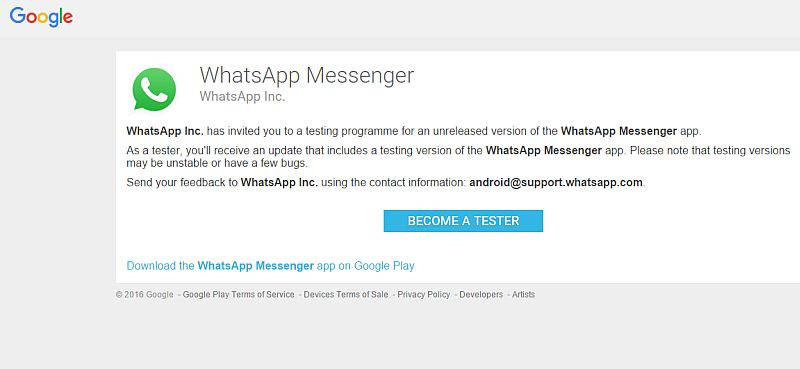
WhatsApp Launches Android Beta Testing Program on Google Play Store

WhatsApp for years has been releasing new version of the app via its website as well as signed APK files before the release hits the Google Play store.

This allowed WhatsApp to make required changes as well as fix bugs, if any, in the app ahead of a broader availability.

One of the biggest disadvantages of the process was the new WhatsApp version only reached limited users who checked
website and were devoted enough to download the release from an "untrusted source."


The Facebook-owned company has launched official beta testing program through Google Play to expand the availability of app to more testers.

Android Police reports that the official Android beta testing program of WhatsApp doesn't require any user to join any Google+ community or Groups in order to participate in testing.

This will not only help WhatsApp in rolling out updates to testers automatically but will also reduce the additional work to download a new version from the company site or APK hosting site.

The official WhatsApp testing page requires users to sign in via their Google accounts.

On opening the page, a message shows up saying, "WhatsApp Inc. has invited you to a testing programme for an unreleased version of the WhatsApp Messenger app."

WhatsApp also warns users that considering WhatsApp Messenger app is a testing version it may be "unstable or have a few bugs."

A WhatsApp spokesperson confirmed the program to TechCrunch but declined to share additional details.

Earlier this month, the messaging service WhatsApp announced that it now had 1 billion monthly active users.

The company added that it handled 42 billion messages sent per day, 1.6 billion photos shared per day, 1 billion total groups, and 250 million videos shared per day.

الجمعة، 4 مارس 2016

Nokia CEO Cries Uncontrollably as Microsoft Acquires Nokia Totally

Nokia CEO Cries Uncontrollably as Microsoft Acquires Nokia

Is a sad news as Microsoft finally acquired Nokia cooperation that means no more Nokia Phones in the market.

During the press conference to announce NOKIA being acquired by Microsoft, Nokia CEO, Stephen Elop ended his speech saying, “we didn’t do anything wrong, but somehow, we lost”. Upon saying that, all his management team, himself included, teared sadly.

They missed out on learning, they missed out on changing, and thus they lost the opportunity at hand to make it big. Not only did they miss the opportunity to earn big money, they lost their chance of survival.
The message of this story is, if you don’t change, you shall be removed from the competition.

Microsoft announced the purchase of Nokia’s phone assets in September 2013 — just weeks after Steve Ballmer said he would step down — and finalized the deal in April 2014.
The total purchase price ended up as approximately $7.9 billion, according to an April 2015 filing with the U.S. Securities and Exchange Commission (SEC).

Blackberry is about facing thesame situation and I wonder how their tears will be considering the facts that WhatsApp has already given them the deadliest blow to end WhatsApp on All Blackberry phones by 2016 ending.

It’s not wrong if you don’t want to learn new things. However, if your thoughts and mindset cannot catch up with time, you will be eliminated. Nokia is now history.

How To get Glo 2gig for 2k

How to subscrib Glo 2gig for two thousand naira

After some couples of weeks that Glo totally Upgraded Glo BIS on Android and Blackberry device N1,000 for 3GB Plan and everyone was a kind of wondering how expensive the new Absolute and Complete plan will be for N1,400 andN1500 respectively but both carries the same 3GB. 


Glo just introduced a new BIS plan For N1,000 and it gives you 2GB. Works like the previous, only that after seeing the light, I don’t think I can ever waste my N1,000 for this mere 2GB plan when I know fully well that I can get more than that adding just N300 on it.

How To Subscrib To This Plan?
Dial *777*25#


Your N1,000 will be deducted and 2GB will be given to you.

How To Borrow Airtime From Glo, Airtel, and Mtn

How To Borrow Airtime From Glo, Airtel, and  Mtn

All the telecom giants has now introduced a ridiculous package called “Borrow me credit”. I wonder what all this telecom companies are thinking of.  While we are still anticipating the so called Android Internet Subscription in order to ease us of data usage with less charge, some internal illegal element introduced “Borrow me credit”.


Well, whether you like it or not, some people will always borrow credit. Instead of you wondering where the next money you’ll use for data subscription will come from, you can easily borrow money from any network of your choice.

If you have intention of doing this without paying back, then make sure you use old sim cards that you’ve long forgotten that’s if it’ not been blocked.


How Can I Borrow Money From Glo,Airtel and Mtn
To borrow Credit from any of the telecommunication, just follow the below info;
==>Glo: To borrow money from Glo, just dial *321# and follow the instruction that will display next
==>Mtn: to borrow Money from mtn, just click here
==>Airtel: to borrow airtime from airtel, just dial *500*Amount# e.g *500*1000#
Flex this package while you are on the go.

How To obtain Payoneer Master Card in Nigeria

How To obtain Payoneer Master Card in Nigeria

Payoneer is an online financial services business that provides online money transfer from any company in the world right to your local bank account and they also engage in e-commerce service payments. Best part of all, Payoneer is free of charge, they offer free services which are too good to pass by.
Free Account CreationYou get a free US Bank account with routing number and allYou can get a Debit MasterCard from Payoneer for free that works on your local ATM machinesYou get a free $25 referral bonus.

Using Payoneer Master Card, you can withdraw your funds from anywhere in the world through MasterCard supported ATM machine. Payoneer is the best choice to withdraw money from PayPal in unsupported countries like Pakistan, Egypt, Jersey, Korea North, Lebanon, and Iran, including Nigeria which PayPal full features not yet enable. Many people also use Payoneer to verify PayPal account with their US payment service.
Payoneer account can be use to receive payments from affiliate and merchants online. It's a convenient way to get paid online. A physical debit Mastercard is sent to your home address for free; you can use it to purchase at online stores, offline stores and to withdraw at local ATM machine in your own currency.
Getting a free Payoneer MasterCard Debit Card In Nigeria is quite easy. All you need is to Sign Up for a Payoneer account and once it is approved, your Payoneer Prepaid Debit Mastercard will be shipped to your doorstep.

How To Apply For Payoneer Mastercard in Nigeria

» Log on to www.payoneer.com and Sign Up for a free account.

» Fill in your full name, address and others, as it is in the ID card you want to use for verification.

» Set password, Secret Question and Answer and select your ID type e.g drivers license and provide the details of the ID as required.

» Enter alternate shipping address if different from the address you provided earlier. Note that, it is the address your Payoneer Debit Card will be shipped to in Nigeria.

» When you are done, click ORDER Button.

You need to exercise patient for the approval. Once approved, you will receive notification via email with the information of your card arrival estimated time.

Thereafter, your Payoneer Mastercard will be shipped to the shipping address you provided during the application process. Delivery of the Payoneer Mastercard to your Nigerian address might take few weeks or months. If the estimated time has passed and your card was not brought to your home address, I suggest that you check the nearest Post Office branch in your locality, give them your name and the shipping address you used to search it for you.

Once you receive the card, you will have to Sign in to the Payoneer website to activate your Payoneer Mastercard. Once activated, you can start using it to withdraw your fund at local ATM machine in your own currency or to purchase at online/offline stores.

If you need a safe, reliable and widely accepted means of payments and carrying out your transactions, then Payoneer MasterCard is what I will recommend. If you have any question please free free to ask in the comment box. Sign Up for Payoneer now.

How to Use WhatsApp as your Google search engine

How to Use WhatsApp as Search Enginem

WhatsApp is one of the largest messaging app available and I think majority of us don't even remember when last you sent SMS to someone because WhatsApp is always their for you. Their are some amazing things you can do with WhatsApp aside of chatting and laughing your ass out.

Do you know that, you can use WhatsApp as mini search engine to search anything out within WhatsApp platform? Yea! You can in easy steps.

A group from India created a WhatsApp bot which allows its users to access certain services ordinarily accessible on the internet only and not through WhatsApp. You can search anything and it will reply you instantly. 

Football lovers are really going to love this because it gives you live update of football matches.

How it works==>First of all add Whatsapp bot called wikibot to your contact list
==>Create a new whatsapp group and add wikibot to the group +918148911230
==>Open the newly created group and simply message hi and you'll get your reply.

To search for something, just type wiki and the name of what you want to search for. E.g wiki nicki minaj.

That's how it works.

How to Get Free N25,000 on Your Airtel Sim

How to Get Free N25,000 on Your Airtel Sim

If you have an airtel sim, the only prayer you should be praying right now is that Airtel should block your line or you should simply go and re-register your line because Airtel is currently giving whooping N25,000 free of charge to call all network when you re register your line.


The question is, your airtel line, is it blocked? Then you are entitled to this awoof of N25,000. Its been a while I ate this kind of telecom money.

How To Report illegal bank charges to CBN

How To Report illegal bank charges to CBN

That moment you are expecting a life changing alert from your bank or someone else only for you to check your text messages and you discovered that your bank has charged you unnecessary N200 for transaction you didn’t make.


Is your bank charging you unnecessarily? Or are they deducting your money anyhow? The good news is you can now report any bank who charge you unnecessarily to CBN and that bank will be mercilessly dealt it.
According to CBN representative Ibrahim Mu’azu, in a bid to put a stop to the series of complaints from bank customers alleging excessive and, in some cases, illegal charges from their respective banksaround the country, the central bank of Nigeria (CBN) has urged bank customers to report illegal and excessive charges by their banks to it (CBN).

How to Report your Bank 

Bank customers are reminded to forward there complaints to:
Director, Consumer Protection Department; email: cpd@cbn.gov.ng
Don’t take chances at all, no bank is loyal… that unnecessary charges is just too annoying.

MTN Stopped The Cheapest Tarriff Plan True Talk+

Bad News: MTN Stopped The Cheapest Tarriff Plan True Talk+


This is more like a sad news because Etisalat pioneer this movement of the cheapest tariff plan calledEasy Life 4.0before MTN follow suite withMTN TrueTalk Pluswhich gives you access to call all network in Nigeria for as low as 11kobo per second,20kbto UK and environs. With this package, you’ll actually know the real value of your money.

The bad news is that MTN decided to stop this package by rolling out a customer unfriendly SMS that“Dear Customer, MTN TruTalk+ plan is no longer available. But you can get more value on MTN trueTalk with 100% on every N100 and above.”I don’t know what prompted this DE-forbidden stoppage but this is absolutely not customer friendly.

Simple Android Server Modified to NetLoop VPN V4.1.0: Works Better and Faster

Simple Android Server modified to NetLoop VPN V4.1.0: Works Better & Faster

Simple Android Serveris now a household name among Android users because it have been saving lives since the era on 1900. The name SAS will only sound strange to you if you are new to Android or you are a free giver who freely gives your airtime to subscribe to excellent data plan on any of the network.This is just to inform you thatSimple Android Serverhas been rebranded with a new name and a new update calledNetLoop VPN. The essence of this VPN is for tunneling purposes.NetLoop vpn contains a proxy server and a free VPN. The good news is that it works excellently well with MTN 0.0 Freebrowsing, Etisalat Chatpak unlimited, BBLited.

NetLoop VPN features V4.1.0:
• HTTP request Compression.
•Ability to modify TCP connection parameters.
• Ability to use hotspot over VPN ( Requires root )
•Ability to use multiple concurrent connections to the VPN servers for the best Network usage experience

Local server features:
•modify outgoing requests.
•specify alternate proxy servers to send a request through
•provide alternate headers and ability to strip headers from incoming http responses
•ability to choose number of connections to be maintained by the app (good for power management)
•ability to share configurations through any file transfer method.
•System wide proxy service.


WhatsApp to Discontinue Supports For All Blackberry Devices and other old devices

WhatsApp to Discontinue Supports For All Blackberry Devices

This is a major blow on all blackberry users not just blackberry users but to all windows phone 7.1 users because WhatsApp have announced to discontinue supports for all version of Blackberry OS includingBlackberry OS 10and older version of blackberry devices and to those Android still running OS 2.1 and 2.2


 WhatsAppearlier this week celebrated 7years of existence and therefore announce that the following devices will no longer offer the kind of capabilities that WhatsApp requires to expand their app’s features in the future.

∆ BlackBerry, including BlackBerry 10
∆ Nokia S40
∆ Nokia Symbian S60
∆ Android 2.1 and Android 2.2
∆ Windows Phone 7.1

This explains one of the reasons why Blackberry wants to dumpBlackberry OS to Android OS. So if you are still using any of the above devices, its time to be planning on getting an iPhone or Android devices. Hence, Blackberry users sorry to blow you rightin the eye because there is no future for Blackberry Phones running on Blackberry OS.Those of you still running Android 2.1 and 2.2 OS, your next neighbor shouldn’t know that’s what you are running before you’ll entirely disappoint Android family. Nokia S60 and S40 users,Infinix Hot 3is about to be launch at a more cheaper price, hence itsadvisable you get yourself one before the end of the year.


الخميس، 3 مارس 2016

How to cancel MTN Subscriptions

A lot of people have been finding it difficult and annoying to unsubscribe and terminate some of the unsolicited MTN messages, but to no avail as these messages poses cost and deduction to costumers with no benefit attached.


Today we are going to fashioned out how these messages will be stop. Follow the stepsHow Can I Opt Out From All MTN
subscription?

>>Dial the code *123*5*1# and reply with 2 to
see your active subscriptions
>>Reply with the serial number of each active
subscription shown and that you want to opt out from
>>Reply with 1 to unsubscribe If you have multiple active subscriptions, then repeat the
process and select any active subscriptions to unsubscribe
from.
It’s easy and fast. Anytime you notice any unhealthy
deduction from your account, quickly check to see that
you’ve cancels all active subscription. below to get it done:


الاثنين، 22 فبراير 2016

Airtel 3GB Data Plan for 1000 naira


Airtel 3GB Data Plan for 1000 naira 


 Airtel Nigeria just launched a new plan, this plan is valid for 30 days and its cap at 3GB.

It works on Android, Iphones, Java and windows phones and PC.

 To subscribe to Airtel 3GB Data plan for 1000 Naira 
  • Recharge 1000 Naira
  • Dial *431# to subscribe to the airtel 3gb data plan for 1000 naira
You can check your data balance by dialing *140#.

الثلاثاء، 19 يناير 2016

Affordable data plan


Affordable Data Plan MTN, Etisalat, Airtel, Glo for Android

If you are one of the Android fan in the world, and you usually surf the net one of it disadvantage is data consumption, and is frustrating especially when one can not afford it and before you these net works have zap your little megabyte. But today am going to give you an alternative which one can smile at last.


Below is the list of the best ones:  

MTN

  
OPTION 1 - Cheapest Data Plan for MTN
Night Plan Reloaded
Price: Total 4.5 GB for N2500
Validity: 30 days
Usage: 1.5 GB for day use
            3 GB for night use
To subscribe: Text “120” to “131”
To check data balance: Text “2” to “131”

The difference between this plan and the previous Night Plan is that you do not have to wait till the 1.5 GB day usage is exhausted before using the 3 GB night usage. It uses both and automatically switches depending on the time of usage.

OPTION 2 (Better)
Data Share
Price: Depending on Reseller
            1 GB for N1200
            2 GB for N2400
Validity: 30 days
Usage: Flat
To subscribe: Transfer the equivalent amount to your reseller
To check data balance: *461*7#

OPTION 3 (Good)
Better Me
Price: 2 GB for N2015
Validity: 30 days
Usage: Flat
To subscribe: Dial *123*4*3*1#
Code to check data balance: *123*4*3*2# or Text “2” to “131”

Airtel

OPTION 1 - Cheapest Data Plan for Airtel
Android 1+1 Offer (Only if you are eligible)
Price: 4 GB for N2000
Validity: 30 days
Usage: 1.5x rate for day use
            Normal rate for night use
To subscribe: Dial *437*1#
Code to check data balance: *223# or *123*9#

Note: Before loading your account, dial *437*1# first, if you are eligible, you will be given an “insufficient credit” message.

OPTION 2 (Better)
Android Plan
If you are not eligible for the first option, you use this one
Price: 1 GB for N1000
Validity: 30 days
Usage: 1.5x rate for day use
            Normal rate for night use
To subscribe: Dial *141*1*3*1#
To check data balance: *223# or *123*9#

OPTION 3 (Good)
Android Plan
Alternatively, you can also use this
Price: 2 GB for N2000
Validity: 30 days
Usage: 1.5x rate for day use
            Normal rate for night use
To subscribe: Dial *437#
To check data balance: *223# or *123*9#


Etisalat 


OPTION 1 - Cheapest Data Plan for Etisalat
New Data Plan
Price: 1 GB for N1000 & 2 GB for N2000
Validity: 30 days
Usage: Flat
To subscribe: Dial “229*2*7#” or "*929*9#"  (updated for all sims) for 1 GB and *229*2*8# for 2 GB
To check data balance: Text “228#”
OPTION 2 (Better)
Data Share
Price: Depending on Reseller
            1 GB for N1500
            2 GB for N3000
Validity: 30 days
Usage: Flat
To subscribe: Transfer the equivalent amount to your trusted reseller
Code to check data balance: *229*9#

GLO


OPTION 1 - Cheapest Data Plan for Glo December 2015
Glo New Data Rates
Price: 1.5 GB for N1000
                     
Validity: 30 days
Usage: Flat
To subscribe 1.5 GB: Dial *777#
Alternatively, dial *777#, enter 1, after that choose 1 again, then press 2, and lastly, choose 1
You can as well share the data with others

To check data balance: Dial 124 or Text “MENU” to “127”

OPTION 2 (Better)

Glo Data Rates
Price: 1.5 GB for N1000
            3 GB for N2000
4.5 GB for N2500
           
Validity: 30 days
Usage: Flat
To subscribe 1 GB: Dial *127*53#
To subscribe 2.5 GB: Dial *127*55#
To subscribe 4.5 GB: Dial *127*58#
You can as well share the data with others

To check data balance: Dial 124 or Text “MENU” to “127”

OPTION 3 (Good)
Glo Overload
Price:
4.5 GB for N3000
Validity: 30 days
Usage: Flat
To subscribe 4.5 GB: Dial *127*54#
You need to subscribe to Glo Overload package to enable you enjoy the data promo. Dial *200# to opt in to Glo Overload.
You can as well share the data with others
Code to check data balance: Dial *127*0# or 124 or Text “MENU” to “127”

===> ENJOY!