‏إظهار الرسائل ذات التسميات How To. إظهار كافة الرسائل

الخميس، 2 يونيو 2016

How To Get Free 10 Rs. Balance On Andriod Mobile[Updated]


Free Balance...By Installing A Single Application
Can U Belive This?
Yes This Is True
By Installing  App You Will Get Free Rs. 10 Balance...As Well As Per Referal You Will Also Get Rs.10 Balance & Referal User Will Also Get Rs.10  Balance..
How To Get Rs.10 Balance Free?
  1. Download The App From Here.[Download Now]
  2. Register Your Mobile Number.
  3. After Registration You Will Get Rs.10 Balance.
  4. Invite Your Friends Via Whatsapp,Email,Sms etc..
  5. Done!Enjoy
By Using This App You Can:
  1. Check Mobile Data Pack.
  2. Manage Mobile Recharge Balance & Pack Balances In One Place.
  3. Check Today's Data Usage.
  4. And Many More.................


الأحد، 22 مايو 2016

How To Install 4 WhatsApp In An Andriod Smart Phone Without Root?


There Would Be A Question Roaming Around Your Mind "Is It Possible To Install Four[4] Whatsapp On Your Android Phone Without Root?"
Well The Answer For Your Question Is "Absolutely Possible"
Now You Would Be Wondering "Dude,How Is That Possible? I Have Now Googl It"
Well,No Buddy I'm Here For You...
Let's See How?
Steps:-

1.     Download The WhatsApp From The Playstore.[Download Now] & Install It.
2.     Download Parallel Space-Multi Accounts Application.[Download Now] & Install It.
→ Now Open The Paralles Space Application And Click On Plus(+) Button & Install Whatsapp.
→Done.
3.     Download Disa Application.[Download Now] & Install It.
→Open The Application And Click On Add Service Button And Install Whatsapp.
→Now Restart The Disa App.
→After Restart You Will See The Message “Whatsapp Settings Needed” And Click On It.
→Now Enter The Name,Phone Number,MCC(Mobile Country Codes) & MNC(Mobile Network Codes).
→Find The MCC & MNC From Here.
→Done.
4.     Download GBWhatsapp Apk File[Download Now] & Install It.
→If It Shows Install Blocked Then Go To Security Settings & Enable/Allow Unknown Sources.
→Done.


الأحد، 15 مايو 2016

How To Activate WhatsApp Video Calling?


We Know That WhatsApp Video Calling Will Be Available Soon.
Currently WhatsApp Video Calling Is  Only For Beta Testers,But Still U Can Enable Whatsapp Video Calling Features In Your Andriod Smart Phone.

How to Enable Whatsapp Video Calling?
  1. Download  WhatsApp Messenger 2.16.80 Or 2.16.81 From Below Link.
  2. Install The WhatsApp Messenger.
  3. If It Shows Install Blocked Then Go To Security Settings & Enable/Allow Unknown Sources.
  4. Now Open Any Chat & Click On Call Button.
  5. You Can See Audio Call & Video Call.
  6. When You Clicked On Video Call Message Shows That
    Couldn't Place Call.It's Because Currently Video Call Is Not Activate For All Users
    But When It Activate You Can Use Video Calling.
Proof Is Here:-


 WhatsApp Messenger 2.16.81 Beta

 WhatsApp Messenger 2.16.81 Beta


WhatsApp Messenger 2.16.80 Beta

السبت، 9 أبريل 2016

How To Upgrade Your PC To Windows 10 For Free?


You can upgrade your PC to Windows 10 for free before July 29, 2016 if you have genuine Windows 7, Windows 8 or Windows 8.1 on your PC. If you upgrade to Windows 10 before July 29, 2016, you will have Windows 10 on that PC for free forever and you don’t have to pay for Windows upgrade. And you will continue to get Windows 10 updates for the supported lifetime of your PC for free.
There are different ways to upgrade your PC to Windows 10, via Windows Update or using the Media Creation Tool. But here I will talk about the best, easiest and the common method for upgrading from Windows 7, Windows 8, Windows 8.1 and even for updating from Windows 10 to the latest Windows 10 November update. That is by downloading the ISO file and upgrading with it. You can upgrade any PC with the ISO file, but you just have to download it once. You can also use ISO file to create a bootable drive and do a clean install.

Check your PC.
Open System Properties on your PC (press Windows + X, and then press Y) and check the Windows edition and System type. You will need to know this for the next steps.

How To Download the ISO file?

  1. Open this link: Microsoft.com/software-download/tec...
  2. Select edition: Select Windows 10 (if you have Windows 7, Windows 8, Windows 8 Pro, Windows 8.1, Windows 8.1 Pro) or Windows 10 Single Language (if you have Windows 8 Single Language, Windows 8.1 Single Language) and click Confirm.
  3. Select the product language: Select English and click Confirm.
  4. Click on 64-bit Download. Click 32-bit Download only if your System type is 32-bit.
  5. Click Save to download the ISO file. It will take some time depending on your internet speed. The size of the ISO file is around 3.7 GB.
The latest ISO file name and size:
  • Win10_1511_1_English_x64 : 4.11 GB
  • Win10_1511_1_SingleLang_English_x64: 3.99 GB
  • Win10_1511_1_English_x32: 3.09 GB
  • Win10_1511_1_SingleLang_English_x32: 3 GB The file name depends on the edition you select in step 2 above, so make sure it is correct. The latest ISO version 1511_1 includes all updates released for Windows 10 until February 2016 including security, non-security and cumulative updates. The OS build of this ISO file is 10586.104. Install the latest updates in Windows Update in Settings after upgrading to Windows 10 or by selecting Download and install updates in step 3 below while upgrading.
  • Links are valid for 24 hours from time of creation. If you couldn’t download within 24 hours, please follow the steps above again.
  • The Windows 10 edition in step 2 have both Windows 10 Home and Windows 10 Pro editions.
  • In step 3 English is English US and English International is English UK. It is better to select English, you can change the language later after upgrading to Windows 10.
  • The ISO file name will be Win10_1511_English_x64 or Win10_1511_SingleLang_English_x64 depending on the edition you selected in step 2.

Upgrade to Windows 10 with the ISO file.

  1. Open the ISO file by double clicking on it. (You will have to use a software like WinRAR to open/extract the ISO Or Cyberlink Power2Go For Mount The iso File on Windows 7.)
  2. Double click setup.
  3. Get important updates: Select Download and install updates and click Next.
  4. Checking your PC: This will take some time.
  5. License terms: Click Accept.
  6. Choose what to keep: Select Keep personal files, apps and Windows settings and click Next.
  7. Ready to install: Click Install.
  8. Installing Windows 10: Your PC will restart several times. This might take a while.
    If it asks for Product Key in step 4, that means you are using the wrong ISO edition or your current Windows is not activated.


There are different ways to use Windows Insider Profram on your Windows 10 PC, via Windows Update or downloading the ISO file and upgrading with it. You can upgrade any PC with the ISO file, but you just have to download it once. You can also use ISO file to create a bootable drive and do a clean install.

Check your PC.
1] Open System Properties on your PC (press Windows + I).
2] Open UPDATE & SECURITY.
3] Open Advanced Options.
4] Click On Get Started.
5] Login With Your Microsoft Account.
6] Done!

How To Download Insider Preview the ISO file?


  1. Open this link: Microsoft.com/software-download.
  2. Select edition: Select Windows 10 Insider Preview Build 14295 and click Confirm.
  3. Select the product language: Select English and click Confirm.
  4. Click on 64-bit Download. Click 32-bit Download only if your System type is 32-bit.
  5. Click Save to download the ISO file. It will take some time depending on your internet speed. The size of the ISO file is 3.82 GB For 64-bit & 2.89 GB For 32-bit.


الجمعة، 8 أبريل 2016

How To Add India Premiere League (IPL) 2016 Schedule To Your Smart Phone?


For Outlook Calendar:-

1. Download the IPL 2016 Schedule From Below Link.
2. Open Outlook & Login With Your Account.
3. Now Open Calendar.
4. Now, Click On Import Button & Open The IPL 2016_Matches.ics File.
5. Click Ok!
6. Done! Enjoy!

For Gmail Calendar:-

1. Download the IPL 2016 Schedule From Below Link.
2. Open Google Calendar Then Click On Settings Icon [Right Corner] Again Click On Settings.
3. Go To 
        Calendars-->Import Calendar-->Choose File-->Import.
4. Done! Enjoy!


Now,Sync Your Smart Phone To View  IPL 2016 Schedule On Your Smart Phone.


 IPL 2016 CALENDER

السبت، 2 أبريل 2016

How To Buy Honor Bee At ₹1?


Specifications:-
  • 1.2 GHz quad-core CPU
  • 8MP main camera + 2MP front camera
  • 4.5" FWVGA(854X480) TN screen
  • 1GB DDR3 RAM,
  • 8GB ROM

How To Buy Honor Bee At ₹ 1?
  1. Visit Hihonor Store Here!
  2. Register An Account Here.
  3. Vist The Store On 8th-10th April EveryDay At 11:00 am.
  4. Add Honor Bee To Your Cart,
  5. If You Are in First 50 Orders List Then You Will Get Honor Bee At ₹1.
  6. Done Online Payment[COD Not Available]
  7. Done!Enjoy!

Terms And Conditions

  • This promotional event is open for all registered users of https://store.hihonor.com/in  only.
  • This promotional event is conducted  by and on behalf ofVision Distribution Pvt. Ltd. (“Vision”) as per the Terms and Condition herein. This promotional Event shall commence from March 30th 2016 at 18:00 and ends on 30thApril 2016 at 18:00.
  • This discount coupon is applicable on Nexus 6P or Honor 7 phones only which are developed by Huawei group and Vision is authorized Distributor of these products. This discount coupon will be valid till 30th April, 2016.
  • The Sales of these products starts from April 8th.
  • This promotional event is open to all https://store.hihonor.com/in  registered users who are residents of India and aged 18+ years.
  • In case of prepaid orders, all order(s) without FULL payment made within 72 hours shall be cancelled automatically
  • All customers are required to fill in their shipping address in order to complete the purchase.


الجمعة، 18 مارس 2016

How To Upgrade WINDOWS PHONE 8.1. To WINDOWS 10 MOBILE?


Find out how to upgrade your phone to from Windows Phone 8.1 to‪ Windows10‬ and how to free up space for the upgrade using the Windows 10 Upgrade Advisor app.
Upgrade Advisor app: bit.ly/UpdateAdvisor
When you open the app link, if it says "To use this app, upgrade to Windows 10." set "Website preference" to "Mobile version" in Internet Explorer settings.


الجمعة، 19 فبراير 2016

Freedom251-Are Users Data Secure?


Freedom 251!
It's been In A Subject Since It Launched.

There Are Many Questions Raising 
Before Order Placed?

  1. Freedom251 Is Real Or Fake?
  2. Phone At ₹ 251 Possible?
  3. Freedom251 Is A Scam?


etc....


But Now Afte Order Placed Another Question Raising

 Are User's Data Secure?
May Or May Not Be Because By This Simple Trick We Get The UsersData.


  1. Go To This Link.
  2. Replace "Order_Number" With  Any Other Orrder Number To See All Data Of The Buyers.
  3. All Orders Start With FDM1455
  4. Now For Checking Enter Your  Friends OrderNumber And Replace with Order_Number & Get Order Deatils.
After All This Still Major Doubt About Payment Method.
They Will Email The Link For Payment In 48 Hours.

But How They Secure The Payment Information?
Let's Wait For The Mail.
And Hope They Will Fix All Problem Soon.


الجمعة، 12 فبراير 2016

How To Share Big Files On WhatsApp?

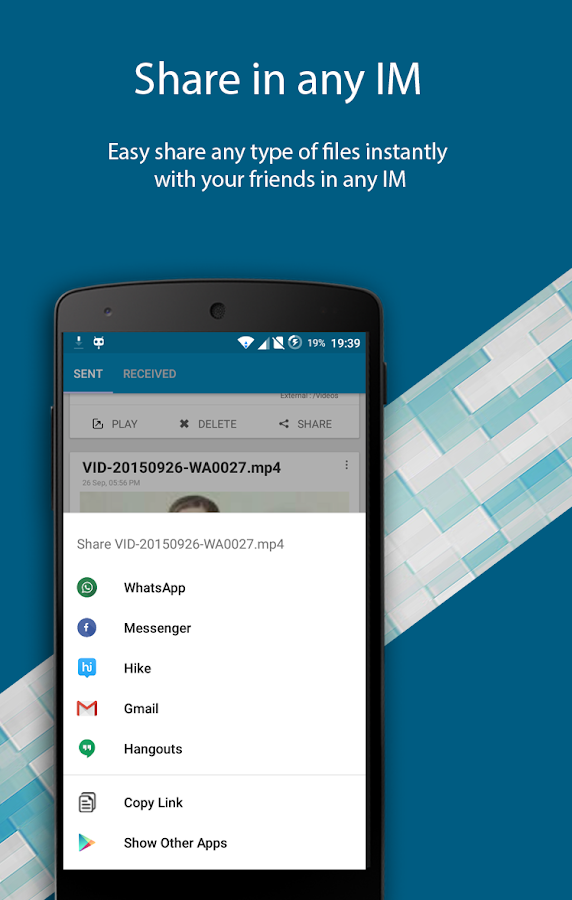
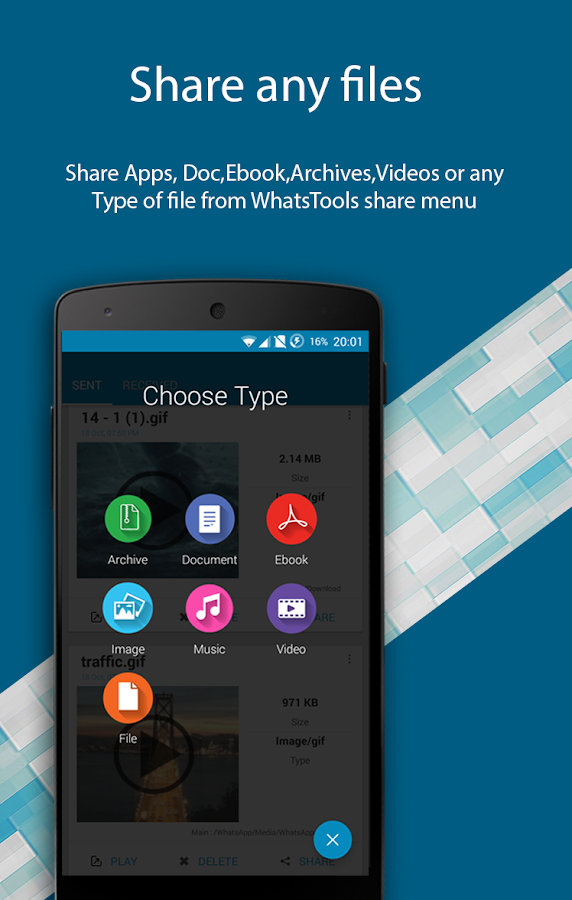
   WhatsTools: Share File Via IM- screenshot

   WhatsTools: Share File Via IM- screenshot

WhatsApp is a very popular mobile messaging app available for google android, Apple iOS, Blackberry, Nokia Series 40,Symbian 60, Windows Phone. In addition to sending text messages over internet, it also allows users to share and send Images,
Audios and Videos with each other. But it has certain limitations :
– It allows users to send only image, audio and video files only.
There is no in-built option to send other file types such as PDF, DOC, APK, etc.
– The maximum video size that can be sent over whatsapp is restricted to 16 MB.
You cannot send videos larger than 16 MB. However whatsapp allow you to trim and compress the video before sending.
But still its a limited feature. We cannot send large videos.
– If you have noticed, when you send images on whatsapp, they are compressed and sent to the receiver.
However the quality is not noticeable on mobile, but it can be noticed on computer.
If we want to send HD images, the quality will be significantly reduced.
The above are the severe restrictions for file transfer in whatsapp. However you can upload the image, video, audio or any other file type without losing quality, to any file sharing site and share it with your friends.
But it will be a lengthy process. So, here is a whatsapp trick to share and send any kind of file and transfer your images, audio and videos without losing its quality. We need one more app along with whatsapp to use this trick.
Follow the below procedure :
Requirements :
WhatsApp,whatsTools
Trick to Send Any File Type in WhatsApp upto 1GB:
WhatsTools – Advanced File sharing for WhatsApp.
You might already be having WhatsApp installed on your phone. Now the first thing you need to do is download WhatsTools.


Play Store :- https://play.google.com/store/apps/details?id=com.whatstools_filesender_app_free_pdf_video_gif_document
1. Now First Install whatstools
App on your device. Open the App, It will prompt you to enable background services
Click ok to continue
Then turn on WhatsTools Service

2. Next click on attach button in WhatsApp or + button in WhatsTools
connect to Google Drive
You will be asked to authorize Google Drive app.
Just Click allow
WhatsTools will create a new folder in your Google Drive with a name WhatsTools.
Once authorization is complete, you can start Sharing.

If you want to use your default Google Drive account, then no problem.
If you want to add a new one only for sharing then create a new Google account.
And authorization that account to your WhatsTools app.

3. Now, to Send any file type,
Use attach button in WhatsTools to share any file or you can diretly share files using WhatsTools.

You can share using file manager. Long press any file. Select share option

Select “Via WhatsTools To AnyWhere”.

share it with WhatsApp or any other IM in your phone.

4. Wait for WhatsTools to upload the selected file to your Google Drive newly created WhatsTools folder.
The transfer time depends upon the file size and your internet connection.
The good thing is receiver can see the uploading status(How much % uploaded by the sender).
Both the users should not need this app installed on their mobiles.
Ony sender need to install WhatsTools. And can sent files to any IM in all platforms.

5. After clicking the share button, you will given option to share the link to several platforms including SMS, Email, WhatsApp,
WeChat, Google +, Facebook and all those IM apps which are installed on your device. At this time we will select WhatsApp.

Select your friend or Group to share the link. The link will be displayed along with the filename.
If it is a video file, your friend can preview the file, if supported. Or he can directly download the file using any browser on his phone.
That’s All. Send any file type with any size without loosing its quality on WhatsApp.

6. You can share files again by click on the share button in sent files.


السبت، 19 ديسمبر 2015

How To Retain Your FREE 15Gb OneDrive Storage?


Recently Microsoft announced that they will be reducing the storage of   Free accounts of  OneDrive to 5GB from 15GB and also the Unlimited accounts to a 1Tb limit. There was a 15Gb of FREE space for the users if they connect their media devices to the OneDrive to store the pictures and movies, Microsoft said they will be withdrawing that also.
Users reacted with this and created a campaign named “Give us back our storage” which received 72,455 votes, and Microsoft reacted positively with that.


Steps:

  1. Visit https://preview.onedrive.com/bonus/
  2. Click on the “Keep your free storage” button Before 29th January 2016
  3. It will display the status As Sucess
  4. Done.


Screenshots


الأربعاء، 16 ديسمبر 2015

HOW TO GET SANDISK CRUZER BLADE 16GB USB DRIVE AT JUST RS 79?


Actiavte This Deal In 5 Easy Steps:

  1.  Goto Ebay Deal Page[DealPage]
  2. Enter your valid contact details & Pin Code.
  3. Agree Terms & Conditions And Submit It
  4. You will receive your coupon code and activation instructions via SMS on or before 22nd December, 2015
  5. Apply and Buy for just Rs. 79/-


ScreenShots:


Hurry! Limited Stock Only! 
Offer valid on First Come First Serve Basis only Terms & Conditions apply If the user is not a First Time transactor on eBay, then he/she will not be eligible for this product

الاثنين، 19 أكتوبر 2015

Best Wireless Hacking Tools


Internet is now the basic need of our daily life. With the increasing use of smartphones, most of the things are now online. Every time we have to do something, we just use our smartphone or desktop. This is the reason wi-fi hotspots can be found everywhere.

People also use wireless in their home network to connect all devices. Every person can see the neighborhood wi-fi networks in the system, and they want to use it for free. But most these networks are secured with a password key. You need to know this security key to access the network. When your own network is down, you will desperately want to connect to these neighborhood networks. For this, people generally search for wi-fi password cracking tools to get unauthorized access to those wireless networks.

Sometimes when you are on a network, you also want to check what is happening on the network. This happens mostly in big organizations, when an employer wants to check who is doing what in the network. For these things, there are a few network hacking tools available that let users analyze packets and see what other users are doing.
In this article, I am going to discuss wireless security and best wi-fi password cracking or recovery tools. I will explain the kind of encryption wireless networks use and how these tools can crack the networks to get access. We will also see what tools let users monitor networks.
Wireless Networks and Hacking
Wireless networks are based on IEEE 802.11 standards defined by IEEE(Institute of Electrical and Electronics Engineers) for ad hoc networks or infrastructure networks. Infrastructure networks have one or more access points which coordinate the traffic between the nodes. But in ad hoc networks, there is no access point; each node connects in a peer-to-peer way.
Basically there are two types of vulnerabilities which can be found in the Wireless LAN. One is poor configuration and the other is poor encryption. Poor configuration is caused by the network admin who manages the network. It may include the weak password, no security settings, use of default configurations, and other user related things. Poor encryption is related to security keys used to protect the wireless network. It is there because of issues in WEP or WPA.
WEP and WPA
WEP and WPA are the two main security protocols used in Wi-Fi LAN. WEP is known as Wired Equivalent Privacy (WEP). It is a deprecated security protocol which was introduced back in 1997 as a part of original 802.11 standards. But it was weak, and several serious weakness were found in the protocol. Now, this can be cracked within minutes. So, a new kind of security protocol was introduced in 2003. This new protocol was Wi-Fi Protected Access (WPA). It has mainly two versions, 1 and 2 (WPA and WPA2). Now it is the current security protocol used in wireless networks. To get unauthorized access to a network, one needs to crack these security protocols. There are many tools which can crack Wi-Fi encryption. These tools can either take advantage of WEP weaknesses or use bruteforce attacks on WPA/WPA2. I am sure now you know that you should never use WEP security.
Basically wireless hacking tools are of two types. One of which can be used to sniff the network and monitor what is happening in the network. And other kinds of tools are used to hack WEP/WPA keys. These are the popular tools used for wireless password cracking and network troubleshooting.
1. Aircrack
Aircrack is one of the most popular wireless passwords cracking tools which you can use for 802.11a/b/g WEP and WPA cracking. Aircrack uses the best algorithms to recover wireless passwords by capturing packets. Once enough packets have been gathered, it tries to recover the password. To make the attack faster, it implements a standard FMS attack with some optimizations.
The company behind the tool also offers an online tutorial where you can learn how to install and use this tool to crack wireless passwords. It comes as Linux distribution, Live CD and VMware image options. You can use any of these. It supports most of the wireless adapters and is almost guaranteed to work. If you are using a Linux distribution, the only drawback of the tool is that it requires deeper knowledge of Linux. If you are not comfortable with Linux, you will find it hard to use this tool. In this case, try Live CD or VMWare image. VMWare Image needs less knowledge, but it only works with a limited set of host OS, and only USB devices are supported.
Before you start using this too, confirm that the wireless card can inject packets. Then start WEP cracking. Read the online tutorial on the website to know more about the tool. If you will follow steps properly, you will end up getting success with this tool.
2. AirSnort
AirSnort is another popular tool for decrypting WEP encryption on a wi-fi 802.11b network. It is a free tool and comes with Linux and Windows platforms. This tool is no longer maintained, but it is still available to download from Sourceforge. AirSnort works by passively monitoring transmissions and computing encryption keys once it has enough packets received. This tool is simple to use. If you are interested, you can try this tool to crack WEP passwords.
3. Cain & Able
Cain & Able is a popular password cracking tool. This tool is developed to intercept network traffic and then discover passwords by bruteforcing the password using cryptanalysis attack methods. It can also recover wireless network keys by analyzing routing protocols. It you are trying to learn wireless security and password cracking, you should once try this tool.
4. Kismet
Kismet is the wi-fi 802.11 a/b/g/n layer2 wireless network sniffer and IDS. It works with any wi-fi card which supports rfmon mode. It passively collects packets to identify networks and detect hidden networks. It is built on client/server modular architecture. It is available for Linux, OSX, Windows and BSD platforms.
5. NetStumbler
NetStumbler is a popular Windows tool to find open wireless access points. This tool is free and is available for Windows. A trimmed down version of the tool is also available. It is called MiniStumbler.
Basically NetStumblet is used for wardriving, verifying network configurations, finding locations with a poor network, detecting unauthorized access points, and more.
But the tool also has a big disadvantage. It can be easily detected by most of the wireless intrusion detection systems available. This is because it actively probes a network to collect useful information. Another disadvantage of the tool is that it does not work properly with the latest 64 bit Windows OS. This is because the tool was last updated back in April 2004. It has been around 11 years since the last stable release of the tool.
Download Netstumbler: http://www.stumbler.net/
6. inSSIDer
inSSIDer is a popular Wi-Fi scanner for Microsoft Windows and OS X operating systems. Initially the tool was opensource. Later it became premium and now costs $19.99. It was also awarded as “Best Opensource Software in Networking”. The inSSIDer wi-fi scanner can do various tasks, including finding open wi-fi access points, tracking signal strength, and saving logs with GPS records.
Download inSSIDer: http://www.inssider.com/
7. WireShark
WireShark is the network protocol analyzer. It lets you check what is happening in your network. You can live capture packets and analyze them. It captures packets and lets you check data at the micro-level. It runs on Windows, Linux, OS X, Solaries, FreeBSD and others. WireShark requires good knowledge of network protocols to analyze the data obtained with the tool. If you do not have good knowledge of that, you may not find this tool interesting. So, try only if you are sure about your protocol knowledge.
Download Wireshark: https://www.wireshark.org/
8. CoWPAtty
CoWPAtty is an automated dictionary attack tool for WPA-PSK. It runs on Linux OS. This program has a command line interface and runs on a word-list that contains the password to use in the attack.
Using the tool is really simple, but it is slow. That’s because the hash uses SHA1 with a seed of SSID. It means the same password will have a different SSIM. So, you cannot simply use the rainbow table against all access points. So, the tool uses the password dictionary and generates the hack for each word contained in the dictionary by using the SSID.
The new version of the tool tried to improve the speed by using a pre-computed hash file. This pre-computed file contains around 172000 dictionary file for around 1000 most popular SSIs. But if your SSID is not in those 1000, you are unlucky.
9. Airjack
Airjack is a Wi-Fi 802.11 packet injection tool. This wireless cracking tool is very useful in injecting forged packets and making a network down by denial of service attack. This tool can also be used for a man in the middle attack in the network.
10. WepAttack
WepAttack is an open source Linux tool for breaking 802.11 WEP keys. This tool performs an active dictionary attack by testing millions of words to find the working key. Only a working WLAN card is required to work with WepAttack.
11. OmniPeek
OmniPeek is another nice packet sniffer and network analyzer tool. This tool is commercial and supports only Windows operating systems. This tool is used to capture and analyze wireless traffic. But it requires you to have good knowledge of protocols to properly understand things. A good thing is that the tool works with most of the network interface cards available in market. This tool is used for network troubleshooting. This tool also supports plugins, and 40 plugins are already available to extend the features of the tool.
12. CommView for WiFi
CommView for WiFi is another popular wireless monitor and packet analyzer tool. It comes with an easy to understand GUI. It works fine with 802.11 a/b/g/n/ac networks. It captures every packet and displays useful information as a list. You can get useful information like access points, stations, signal strength, network connections and protocol distribution.
Captured packets can be decrypted by user-defined WEP or WPA keys.
This tool is basically for wi-fi network admins, security professionals, and home users who want to monitor their wi-fi traffic and programmers working on software for wireless networks.
13. CloudCracker
CloudCracker is the online password cracking tool for cracking WPA protected wi-fi networks. This tool can also be used to crack different password hashes. Just upload the handshake file, enter the network name and start the tool. This tool has a huge dictionary of around 300 million words to perform attacks.
Conclusion
In this post, I discussed 13 wireless hacking tools. A few wireless hacking tools are for cracking the password to get unauthorized access, and a few are for monitoring and troubleshooting the network. But most of the people really interested in tools to crack wireless hotspots just want to get free Internet access.
The above collection also contains those tools which try a dictionary attack to crack wi-fi passwords to allow you to get free Internet access. But be sure not to use these tools in a risky place. Hacking wireless networks to get unauthorized access may be a crime in our country. You may get into trouble for using these tools. So, please do not use these tools for illegal works. As I already mentioned, you should never use the WEP encryption key in your home or wireless network. With available tools, it is child’s play to crack the WEP keys and access your wi-fi network.
Wireless monitoring and troubleshooting tools are basically for network admins and programmers working on wi-fi based software. These tools really help when some of your systems face problems in connecting to the network.
I hope you enjoyed this article and got relevant information about popular wireless hacking and password cracking tools. I tried my best to compile this list of password hacking tools, but as a human error, I may miss something. If I forgot any important tool in this, please let me know in the comments.
Source:Techno Half